


After creating a new attribute dimension in PBCS/EPBCS, I tried leveraging it in a Business Rule right away but surprisingly the rule wouldn’t validate without throwing the following error “Error:The dimension needs to be a text attribute dimension”

Supposedly, the new text attribute dimension isn’t being recognized as a text attribute dimension. It’s not a big issue since the validation error doesn’t prevent the rule from working but if you want to get rid of this validation error, all you have to do is go to the System View tab of Calc Manager, right click on Planning and select Refresh.
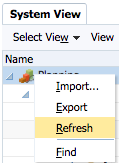
You should now be able to validate the business rule without issue.

I’ve encountered the same issue with newly added UDA’s not being recognized in Calc Manager. Need to perform the same refresh.
Pete
Good One, thanks!
Doesn’t work for me. Also opened outline in EAS and the ATTR DIM is there. Good Ole Oracle. Garbage.
Hi – this was for PBCS. I actually never had this issue on on-prem but I haven’t used it in a long time. When you mention EAS, you are still referencing an onprem planning app right?
Yes. It’s On Prem planning app. The rule still runs and calcs correctly though. We are upgrading to 11.2 and it seems OK there. Probably a bug that was fixed. Who knows.
Good luck with that! not sure why in your case.